My Equipment: local machine records and maintenance notes
Save equipment identifiers, notes and calculator inputs in this browser. Add dated maintenance entries to each machine.
This optional feature requires JavaScript and local storage; it has no account or cross-device synchronization. Keep a separate copy of important service records before clearing browser data.
This browser is not allowing local storage right now, often because of a private/ incognito window or a strict privacy setting. Saved equipment needs it turned on.
Add a machine
What a saved input means
Calculator prefill matches saved field names and fills eligible empty fields when a machine is selected. It does not identify a machine’s correct specification from its year or brand. Recheck the units, model and job before calculating again.
For example, a saved generator load belongs to the appliances counted for that calculation. Adding another appliance changes the required input even if the generator’s name has not changed. A note saying “oil changed” also needs the date, hours and actual fluid to be useful as a service record.
Keep a separate record
Browser site-data deletion, another device, a different browser or private-session behavior can remove or hide these records. Local storage is not a backup. Copy identifiers and essential service history somewhere you control before relying on the feature.
Use the remove controls to delete a machine or log entry in this browser. Optional saving from a calculator retains entered values; it does not certify a result or verify work was completed. See privacy details and maintenance timing.
Your saved machines
My Equipment
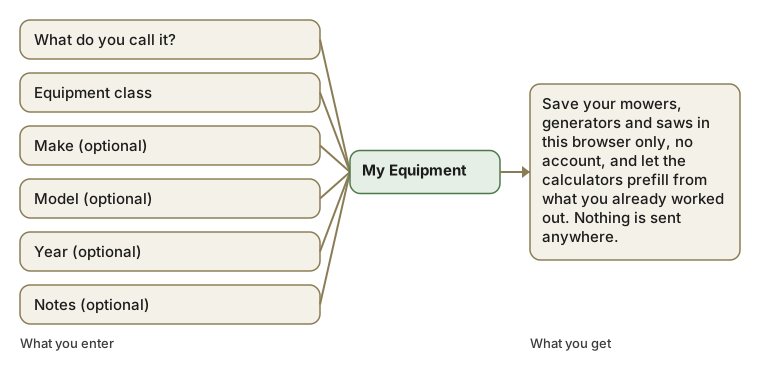
A place to keep the machines you own and the numbers you have already worked out for them, stored only in this browser, so a calculator you used once can prefill itself the next time and a simple maintenance log stays next to each machine. Save a mower, a generator or a saw with its class, make, model and year, and every calculator that touches that class of machine offers to prefill from what is already saved rather than asking again. There is no sign-up and no server: the record lives in this browser's local storage the same way a shopping cart does, and clearing site data, switching devices or opening a private window empties it.
Nothing saved here is ever sent anywhere.
Save a machine here once, a mower, a generator, a chainsaw, and this site starts working for that specific machine instead of machines in general: the calculators can prefill from the numbers you already worked out, and you can keep a simple maintenance log next to it. Save nothing and the site works exactly as it does now.
This is not an account. There is no sign-up, no password and no server that ever sees this.
It is stored in this browser only, using its ordinary local storage, the same mechanism a shopping cart or a dark-mode preference uses. Clear your browser's site data, switch devices or open a private window, and it is gone.
Nothing here is ever sent to us or to anyone else.
This browser is not allowing local storage right now, often because of a private/ incognito window or a strict privacy setting. Saved equipment needs it turned on.
| Field | Where it is used |
|---|---|
| Equipment class | Matches you to the right calculator defaults (mower, generator, saw…). |
| Make & model | Shown on the saved-machine card, so a list of several stays readable. |
| Year | Flags a machine old enough that repair-or-replace is worth checking. |
| Notes | Free text: a maintenance log line, a part number, anything. |
Your saved equipment
Add a machine
My Equipment: questions
Is My Equipment an account? Do I need to sign up?
No. There is no sign-up, no password and no login. What you save here is written to this browser's own local storage, the same mechanism a shopping cart or a dark-mode setting uses, and is never transmitted to us or to anyone else. "Account" implies a relationship with a server that holds your data; nothing here reaches a server at all.
What happens to what I save if I clear my browser or switch devices?
It is gone. Local storage lives only in the specific browser on the specific device where you saved it, so a private window, a cleared cache, a different browser or a different computer all start empty. There is nothing to recover, because there is nowhere else it was ever kept.
Can I export or back up what I have saved here?
Not yet as a dedicated feature. Copying a calculator's result with the "Copy result" button after a calculation is the current way to keep a durable record of a specific number outside the browser; a full export is a reasonable next step if enough readers use the guide to justify building it.
Is what I save encrypted?
It is stored as plain, unencrypted text in your browser's local storage, the same way most sites store a shopping cart or a saved search. Anyone with access to your unlocked device and browser could, in principle, open developer tools and read it. Do not save anything here you would not want someone using your computer to see.
What happens when I delete a machine?
Its record, its saved numbers and its whole maintenance log are removed from local storage immediately and cannot be recovered, which is why the delete button asks you to confirm first. Nothing is soft-deleted or held anywhere in case you change your mind.
Does saving a machine change what a calculator computes?
No. Saving only prefills a field with a number you already entered before; the calculator runs the identical formula on whatever is in the field at submit time, whether you typed it fresh or it arrived prefilled. Prefilling changes convenience, never the arithmetic.
If I save the same machine on my phone and my laptop, do they stay in sync?
No, and that is a direct consequence of nothing being sent to a server: each browser on each device keeps its own separate copy. Saving a generator's running watts on a laptop does not appear on a phone unless you save it there too.
Can I save more than one machine?
Yes, there is no limit built into the feature beyond what your browser’s local storage can hold, which is normally megabytes, far more than a list of machines and log entries would ever use. Save a mower, a generator and a chainsaw separately and each keeps its own numbers and its own log.