Tiller bounces or vibrates: separate setup, ground and damage
Stop for abnormal vibration, impact or entangled material. Isolate starting power before inspecting the tines and drive.
Then check the machine’s approved tine arrangement, depth setting and operating technique for the soil. Bouncing does not uniquely prove that the machine is broken or the wrong type.
New ground is not restricted to one layout
Honda’s tilling tips describe model-specific handling and adjusting tine speed on the FG110. The FG110 product page describes breaking new ground as well as cultivation. A universal claim that front-tine equipment cannot work unbroken soil would contradict this application.
| Condition | Check |
|---|---|
| Bouncing without damage | Permitted technique, depth and soil condition |
| New vibration after impact | Stop and inspect tines, fasteners and drive |
| Wrapped material | Isolate and clear by the manual, not while turning |
| Engine runs but tines do not work | Actual engagement and drive inspection |
Tine arrangement changes the job
The FG110 has a 9-inch normal width and a permitted 6-inch narrow arrangement with outer tines removed as directed. Across a 36-inch bed, ideal no-overlap coverage takes four 9-inch passes or six 6-inch passes. That 50-percent increase in pass count is a planning example, not proof of digging speed or a required arrangement for every soil.
The FG110 manual gives tine installation and operation instructions for its stated model. Correct left/right position, attachment and any required guards matter. Do not reverse tines or omit guards based on an unrelated machine’s instructions.
Keep drive checks static unless the procedure says otherwise
Do not move near rotating tines to compare speed with engine sound. Belt, chain, gear and clutch arrangements vary. A hypothetical engine-speed change with no useful digging does not identify which drive component failed.
Check the digging area and buried services before work, and keep people clear. Use tiller selection for job fit and qualified service for bent parts or a drive fault. Do not straighten a damaged tine to continue a test.
TS-10 · Troubleshooting
Tiller vibrates or will not dig in
A tiller that bounces across the ground instead of digging in is frequently not broken at all. A front-tine tiller is pulled forward by its own tines and needs already-broken ground to get purchase, so it will skip across compacted soil or sod regardless of condition. Once machine type is ruled out, the mechanical causes run in a fixed order: a slipping tine-drive belt or chain that lets the engine race while the tines lag, grass or wire wrapped around a tine shaft producing uneven digging, an bent tine producing a rhythmic vibration, and a depth stake set wrong for the pass.
Each has a distinct symptom that separates it from the others.
Disconnect the spark plug lead before reaching anywhere near the tines, including to clear a wrapped obstruction. Tines are driven by the same engine that a pull cord can spin over unexpectedly.
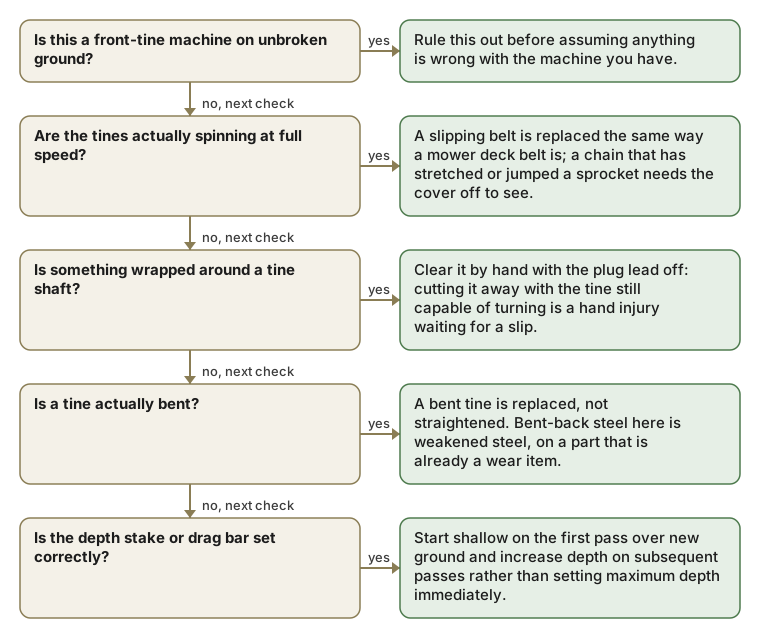
Bouncing across the ground is not the tines being dull
A tiller that hops or skips across the surface instead of digging in is very often the wrong machine for the ground, not a fault: a front-tine tiller is pulled forward by its own tines and needs soil that is already broken up to get purchase, and it will bounce across compacted ground or sod every time regardless of condition. Confirm the machine type against the job before troubleshooting anything mechanical: see tillers and chippers for which layout opens new ground.
1. Is this a front-tine machine on unbroken ground?
That is the expected behavior of that layout on that ground, not a fault. A rear-tine, counter-rotating tiller is what opens compacted soil or sod.
If that is it: Rule this out before assuming anything is wrong with the machine you have.
2. Are the tines spinning at full speed?
A slipping tine-drive belt or chain lets the engine race while the tines turn slowly or intermittently, which looks like "not enough power" but is a drive-train fault. Watch the tines directly while opening the throttle rather than judging by engine sound.
If that is it: A slipping belt is replaced the same way a mower deck belt is; a chain that has stretched or jumped a sprocket needs the cover off to see.
3. Is something wrapped around a tine shaft?
Long grass, root fiber and wire wrap tightly around a tine shaft and can bind it partially without stopping it entirely, which produces uneven digging and vibration rather than a dead stop. This is a common, cheap fix mistaken for a bent tine.
If that is it: Clear it by hand with the plug lead off: cutting it away with the tine still capable of turning is a hand injury waiting for a slip.
4. Is a tine bent?
A bent tine wobbles visibly when turned by hand and produces a rhythmic vibration that a wrapped obstruction does not. Compare the suspect tine’s path against an undamaged one on the same shaft.
If that is it: A bent tine is replaced, not straightened. Bent-back steel here is weakened steel, on a part that is already a wear item.
5. Is the depth stake or drag bar set correctly?
The depth stake (or drag bar) at the rear controls how deep the tines bite by resisting forward travel. Set too shallow, the machine skates across the top; set too deep on a first pass, it can stall or walk unpredictably.
If that is it: Start shallow on the first pass over new ground and increase depth on subsequent passes rather than setting maximum depth immediately.
The five checks, condensed
| Symptom | Cause | Fix |
|---|---|---|
| Bounces or skips across unbroken ground | A front-tine machine being asked to work compacted soil or sod | Not a fault: use a rear-tine, counter-rotating tiller for that ground, or break it up first. |
| Engine races but tines turn slowly or intermittently | A slipping or stretched tine-drive belt, or a chain that has jumped a sprocket | Replace the belt, or open the cover to check the chain. |
| Uneven digging and vibration, no full stop | Grass, root fiber or wire wrapped around a tine shaft | Clear it by hand with the plug lead disconnected. |
| Rhythmic vibration; the tine wobbles when turned by hand | A bent tine | Replace the tine: do not straighten it. |
| Skates across the top, or stalls and walks unpredictably | The depth stake or drag bar set wrong for the pass | Start shallow on the first pass and increase depth on later passes. |
Tiller vibrates or will not dig in: questions
Why does my tiller bounce instead of digging in?
If it is a front-tine tiller working unbroken ground, that is expected behavior of that layout rather than a fault. A front-tine machine is pulled forward by its own tines and needs already-broken soil to get purchase. A rear-tine, counter-rotating tiller is what opens compacted ground or sod.
What causes a tiller to vibrate badly?
Most often something wrapped tightly around a tine shaft, grass, root fiber or wire, which binds it partially without stopping it and produces uneven digging along with the vibration. A bent tine produces a more rhythmic vibration and wobbles visibly when turned by hand; compare it against an undamaged tine on the same shaft.
Why does the engine race while the tines turn slowly or intermittently on my tiller?
Check the tine-drive belt, chain and couplings when engine speed stays normal but tine speed falls. A slipping tine-drive belt or a chain that has stretched or jumped a sprocket lets the engine reach full speed without transmitting that speed fully to the tines, which sounds and feels like "not enough power" but is fixed by replacing the belt or repairing the chain, not by anything to do with the engine itself.
How do I safely clear debris wrapped around a tiller's tine shaft?
Disconnect the spark plug lead first, every time, since tines are driven by the same engine a pull cord can spin over unexpectedly. Clear the wrapped grass, root fiber, or wire by hand only once the lead is off. Cutting or pulling at wrapped debris while the tine is still capable of turning is a hand injury waiting for an accidental spin.
Can a bent tine be straightened and reused instead of replaced?
No: bent-back steel on a tine is weakened steel on a part that is already a wear item, so straightening a bent tine leaves it more likely to fail again, potentially at a worse moment. Replace a bent tine rather than attempting to straighten it back into shape.
What is the depth stake or drag bar on a tiller, and how does it affect digging?
It's a bar at the rear of the machine that controls tine depth by resisting forward travel: set too shallow, the machine skates across the top of the soil without digging in; set too deep on a first pass over new ground, it can stall the engine or cause the machine to walk unpredictably. Starting shallow and increasing depth on subsequent passes avoids both failure modes.
Does a tiller vibrate differently depending on soil moisture?
Yes, somewhat: very dry, hard soil can cause more bouncing and skipping (especially on a front-tine machine already marginal for the ground condition) while overly wet, sticky soil can load the tines unevenly as clumps build up and release, both producing vibration patterns distinct from the mechanical faults (wrapped debris, a bent tine, a slipping belt) the guide focuses on.
Should I check tine bolts and mounting hardware as part of diagnosing tiller vibration?
Yes: loose mounting hardware holding a tine to its shaft can allow slight movement that produces vibration distinct from a bent tine or wrapped debris, and it's a cheap, fast check (confirming bolts are torqued to spec) worth doing alongside the tine-shaft and belt checks the guide walks through in order.
Is it normal for a tiller to vibrate more when working through recently cleared, rocky ground?
Some additional vibration from tines striking buried rocks is expected and not itself a fault, but repeated hard impacts can bend a tine or loosen mounting hardware over time, if vibration persists or worsens after clearing rocky ground, checking for a newly bent tine or loosened hardware from those impacts is a reasonable next step.
Does a tiller's gearbox contribute to vibration if its oil level is low?
A gearbox running low on oil can develop increased internal wear and noise over time, which can manifest as vibration in addition to reduced digging performance. Checking gearbox oil level is a maintenance item distinct from the tine-and-belt checks the guide covers, worth verifying if vibration persists after ruling out the more common causes.
Can uneven tire pressure on a tiller's wheels (where equipped) cause a bouncing or vibrating symptom?
On a rear-tine tiller with pneumatic wheels, unequal tire pressure could contribute to an uneven ride and inconsistent tine engagement with the ground, similar in principle to how unequal mower tire pressure tilts a deck, though the more common vibration causes on a tiller remain the tine-shaft and belt issues the guide addresses first.
Does a tiller's engine mount or frame ever loosen enough to cause vibration separate from the tines?
Yes: loose engine mounting bolts or a frame fastener that has worked loose from sustained vibration can introduce a rattle or shake distinct from tine-related causes, and it's worth a quick visual and hand-check of major fasteners if the tine-shaft, belt, and depth-stake checks the guide walks through don't fully resolve the symptom.